Skip to content

GC551G2 Live Gamer Extreme 3

  • Perfect for Gamers & Content Creators: The GC551G2 records 4K30 gameplay, supports high refresh rates up to 1080p240, and VRR pass-through at 1440p120 or 1080p120.
  • Ultra-low latency: Experience virtually no delay in the pass-through signal, ensuring a smooth and responsive streaming or gaming session.
  • Plug & Play: No complicated setup required- Stream effortlessly by connecting the capture card to your Mac or PC.
  • Wide Compatibility: Capture crystal clear gameplay from popular consoles like PS5, Xbox One X/S, Switch, and Mini NES on PC and Mac. Stream on various platforms including YouTube, Twitch, and more using AVerMedia RECentral.
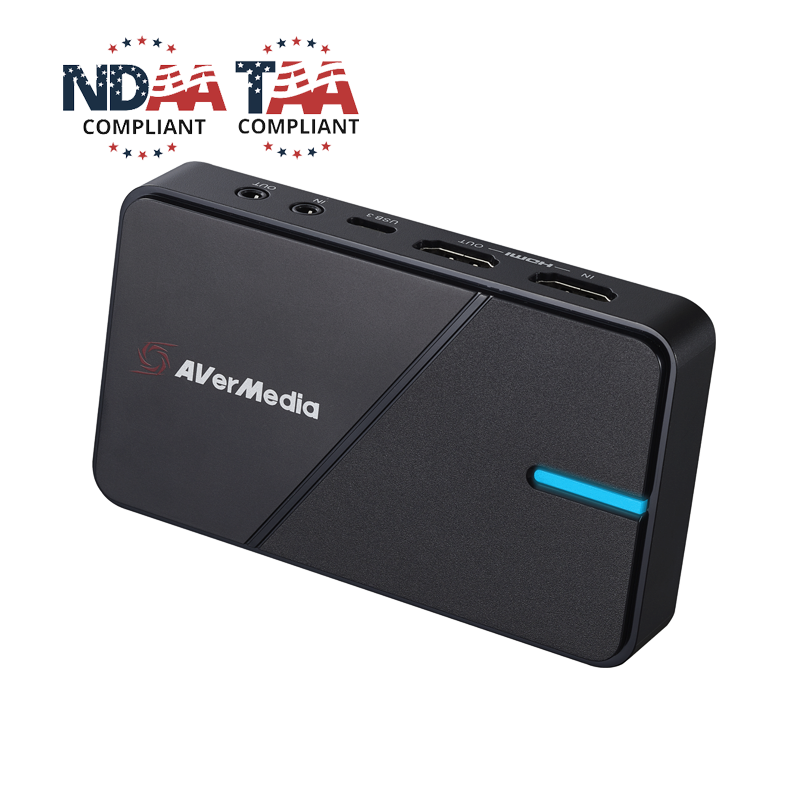
  • TAA/NDAA Compliant: Meets requirements of the Trade Agreements Act (TAA) and the National Defense Authorization Act (NDAA) for government procurement and national security compliance.
10 reviews

GC551G2-stickerless

Sale price $ 129.99
Regular price $ 169.99
Available

GC551G2 Live Gamer Extreme 3

Level Up Your Gameplay & Streaming

Elevate your stream with professional 4K30 capture, tear-free VRR, and ultra-low latency—all in a simple plug & play setup.

⚡ 4K30 Ultra HD Capture

Capture every detail of your gameplay with stunning 4K resolution.

🎮 VRR Passthrough

Enjoy smooth gameplay with VRR pass-through support up to 1440p120.

⏱️ Ultra-Low Latency

Zero-latency pass-through keeps your game and stream perfectly synced.

🔌 Plug & Play

Get started instantly with driver-free UVC support for Windows and macOS.

🎙️ Audio Line-In & Out

Mix or route audio easily via built-in 3.5mm ports.

📱 Multistreaming with RECentral

Stream to Twitch, YouTube, and Facebook simultaneously using AVerMedia’s RECentral software.

Get immersed in your gameplay

  • Casual Streaming Optimized for PS5, Xbox, and Switch for high-quality broadcasting.
  • Pocketable but powerful Ensure your gameplay & video stream are smooth and lag-free.
  • Advanced Content Creation Boost your channel with scene editing, chroma key, and high-res recording.
  • Casual Streaming Optimized for PS5, Xbox, and Switch for high-quality broadcasting.
  • Pocketable but powerful Ensure your gameplay & video stream are smooth and lag-free.
  • Advanced Content Creation Boost your channel with scene editing, chroma key, and high-res recording.

Specifications

Specifications
  • Interface: USB 3.2 (Gen 1) Type-C (plug and play, UVC)
  • Video Input: HDMI 2.0
  • Video Output (Pass-Through): HDMI 2.0
  • Audio Input: HDMI 2.0 / 3.5 mm Line In (3-Pole)
  • Audio Output (Pass-Through): HDMI 2.0 / 3.5 mm Line Out (3-Pole)
  • Maximum HDR Pass-Through Resolutions: 2160p60 / 1440p120 / 1080p240
  • Maximum VRR Pass-Through Resolutions: 1440p120 / 1080p120
  • Supported Resolutions (Video Input): 2160p, 1440p, 1080p, 1080i, 720p, 576p, 480p
  • Maximum Capture Resolutions: 2160p30 / 1440p60 / 1080p60
  • Dimensions (W x D x H): 112.5 x 66.1 x 20.9 mm (4.43 x 2.6 x 0.82 in)
  • Weight: 85 g (3 oz)

Notes:
1. LGX3 does not support viewing/recording/streaming of HDCP-protected signals
2. LGX3 does not support USB 2.0
3. Intel chipset is strongly recommended

System Requirements

Windows®10 x64 / 11 x64 or later

  • PC: Intel® Core™ i5-6XXX / AMD Ryzen™ 3 XXX or better + NVIDIA® GeForce® GTX 1060 / AMD RX 5700 or better
  • Laptop: "Intel Core i7-7700HQ + NVIDIA GeForce GTX 1050 Ti or better
  • 8 GB RAM recommended

macOS 13 / 14 or later

  • 3.6 GHz quad-core Intel Core i7
  • Radeon Pro 555 with 2 GB VRAM
  • 16 GB 2400 MHz DDR4 memory

iPadOS 17 or later

What's in the Box
  • Live Gamer EXTREME 3 (GC551G2)
  • Type-C to Type-A Cable
  • HDMI 2.0 Cable
  • Quick Start Guide

Product Comparison

Max Capture

4K30

Max Pass-Through

4K60 HDR

VRR Pass-Through

1440p120

Interface

USB 3.0

HDMI Standard

HDMI 2.0

Max Capture

4K144

Max Pass-Through

4K144 HDR

VRR Pass-Through

4K144

Interface

USB 3.2

HDMI Standard

HDMI 2.1

Recommended Products

Customer Reviews

  • 5 stars: 8 (80%)
  • 4 stars: 2 (20%)
  • 3 stars: 0 (0%)
  • 2 stars: 0 (0%)
  • 1 star: 0 (0%)
P
PixelGod
Easy to Use. Awesome Company Support.

This is the first capture card that I have had the pleasure to use. There are various connection options that allow connectivity through HDMI and USB, and also audio connections through 3.5mm cables.

The Avermedia website is fantastic and made it easy to setup and start using the device right away. If you do not have your own recording software they offer their own package built for recording straight from this device.

If you plug it into a PC you can also use it as a Video Input Source and record directly in your favorite software easily. With 4K support the visuals are great and I did not notice any lag while using it.

I have used it to record Nintendo Switch gameplay, and have used it multiple times to stream computer output to my laptop for recording and because I do not have any auxiliary monitors to connect to them.

This has been a fantastic and easy-to-use little device. It is super portable and easy to carry around and I love using it and look forward to using it a lot more in the future. If you're interested in capturing, recording, and/or streaming your gameplay you need to check out this capture card as I think you won't be disappointed.

C
C. L.
AVerMedia is amazing.

Definitely a great capture card, absolutely recommended for those that are looking for something effective in recording and streaming.

O
Oval D.a.B.
Works great for passthrough and recording

My use case for screen recording is a little different as it's not for fast gaming, and just screen recording the use of general software applications. Works perfectly for me.

V
V
Multi platform compatible 4K gaming capture card with ultra low latency that won't break the bank

This is my first time using a capture card. The card comes with everything needed for set up. Set up was simple, even for a beginner like me.

I have used it on my Xbox, Switch, and mobile. The video and picture quality is amazing. I have had zero issues with lag. The VRR is nice, but I have nothing to really compare it to.

This card would be a great option for someone not wanting to spend a few hundred or more on one of these.

Overall, this card has performed very well.

D
Dipped i.I.
Amazing low latency feature

There are a few things to love about this gaming capture card. It is advertised as being perfect for gamers and for content creators, especially if you do both like me! I am constantly buying devices to save data and store information from my streaming platforms, but it is getting cluttered and I find that these other hard drives aren’t as easy to access and can’t be used during streaming, only after. However, this one plugs into your console or PC while you are gaming to record and store your information. It is easy to use this because you don’t ever have to do one mega download as some other ones require–simply unplug whenever you’re ready and it is good to go. Otherwise, this has a fantastic low latency feature where it doesn’t cause any kind of lag when you’re streaming even though it is collecting information.

The only thing I don’t like about this console is that it has a horrible customer service team. When it came in the mail, I initially thought that the cord it was supposed to come with was missing (turns out it was just hiding taped to the underside of the plastic compartment–weird), but I contacted customer service to help with this issue. You can’t talk to a real human at all no matter how many different avenues you take with the robot. Their answer is always about the actual technology and not about practical issues you might be having.

If you’re okay with a shotty customer service team, this is a pretty awesome capture card and I recommend it to gamers!

M
Mel
Better than the Elgato capture cards!

I got the live gamer extreme 3 after a lot of latency and lag with the elgato hd60 s. It came with everything needed like the usb-C cable and HDMI as well with a manual (which I didn’t use since the set up is straightforward if you’re someone familiar with capture cards already lol)!

It took me a bit to get it all set up fine - I made the mistake of using the usb-c to usb-3.0 from my elgato capture card at first but after connecting everything to its rightful techs everything went fine! I was so scared about latency but I was met with an accurate input of buttons right as I pressed them. Phew!

One thing I noticed was that when you go on full screen for the switch, you can notice slight pixelation which is completely fine considering you’re scaling a small image to a 1920x1080 pixel resolution — it’s barely even noticeable unless you’re someone who is familiar with tech and computers.. but I will try to tweak with it to see if I can fix that.

K
K. T.
Excellent

I'm not much of a gamer so can't comment on that aspect of this device, but I can tell you it works very well for livestreaming from a DSLR. The card is plug and play and AVerMedia RECentral is fairly simple to use even for someone with limited technical skills (i.e. me), so I found it pretty easy to hook up to my camera and stream live to YouTube.

I don't have enough experience with capture cards to offer any comparisons with other brands and models, but I'm happy with the performance. I think it'll be a while before another device comes along that suits my needs so well.

R
Realm o.N.
THE BEST CAPTURE CARD......FOR NOW.

This is probably the best capture card that you can get….. at least for now.

The box includes the capture card, an HDMI cable, a USB Type-A to Type-C cable, and the manual. Like most USB capture cards, this is plug and play without much setup having to be done. Just plug in the HDMI cables, connect it to your PC, and you’re pretty much ready to go. Just install OBS, AverMedia’s own capture utility, or whatever software you normally use for recording and streaming. For my purposes, I used OBS. Setting up in OBS is a breeze; just add a new video input device, select the Live Gamer Extreme 3 from the list, and add it to your sources. You can also open the settings for this source and change your resolution, frame rate, and other settings without any additional software.

This capture card supports full 4K60FPS passthrough while also being able to record up 4K @30FPS, 1440 @60FPS, and 1080 @60FPS. The capture card also supports full HDR in the passthrough as well as supporting Variable Refresh Rate (VRR) up to 120FPS in both 1440p and 1080p Passthrough modes. When VRR is off, you can get a maximum of 240FPS supported in passthrough when in 1080p. Basically, you can enjoy the most out of the content from your PC, Console or any other connected device without having to make any compromises. There is also a line-in port on the device if you want to use a Chat Link or similar product to record party chat audio and game audio from your controller if you choose. This could be easier than using the default audio settings, as sometimes OBS takes a little more effort to get the audio to capture correctly depending on your settings. (I had to manually add a separate audio source for the capture card and choose it in the HDMI audio list for OBS to record the audio as OBS wouldn’t detect it automatically sometimes, but this is more of a software issue than with the card itself.)

The video quality is incredible whether you record in 1080p, 1440p, or 4K. I noticed no artifacting, hitching, or stutters of any kind and the capture card worked flawlessly. The audio sounded great, and I was able to balance the settings perfectly so my microphone paired nicely with the game audio. The image quality also has more color and is more vivid than some cheaper brand capture cards I have used in the past. Even compared to more expensive Elgato cards, the quality here is as good if not better than those. Not to mention that this card is cheaper as well.

Overall, this is a stand out card that checks all the boxes. It has 4K recording, 4K passthrough, and works flawlessly. The only thing missing is being able to record in 4K60, but since the monitor I use is 1440p, I won’t be recording in 4K anyway. Regardless, if you do still want a 4K capture card, this will work perfectly if you don’t mind the 30FPS limit. For everything else, you will be able to record in 60FPS with no issues.

I highly recommend this capture card to anyone looking to buy a good, high quality, endlessly versatile capture card to use with their system. Whether you are running a Dual-PC setup, playing on a PlayStation, Xbox, or Switch, or even using mobile devices, this will do it all with no issues. In my opinion this is currently the best capture card with the best balance of quality, performance, versatility, ease of use and most importantly, the cost. For now, at least for the next couple years, this is one of the best capture cards you can buy.

Thanks for reading.

S
Science4Life
Great for gaming, also great for content creators

Originally I was using a cheap USB 3.0 capture device, felt it was about time to move up to a better product that supported recording resolutions above 1080p30. AVerMedia GC551G2 Live Gamer Extreme 3 supports recording resolutions of 2160p30, 1440p60 & 1080p60. I don't have a current gaming console nor a 4k monitor to really test the 4K30 capture support, however when it comes to streaming you're more than likely wanting to stick to 1080p or 1440p as some streaming platforms the bit-rate tops out somewhere between 3500-4000.

As far as my usage experience goes I didn't use a desktop as I felt it would be interesting to try it on a gaming laptop as it would be more on par with desktop users with a NVMe SSD, I opted to use OBS Studio as I like to fine tune my bit-rate settings for the GPU encoding. The first test was play a game from an older console, didn't experience any latency or audio sync issues so from there it passed the gaming test as video quality was perfect. The second test was capture HDMI out from an older laptop, I have no idea if I under-estimated audio output of HDMI but I had to use the 3.5mm headphone port for audio, the video quality was flawless while the audio left a bit to desire--I did try a Chromebook and audio over HDMI worked.
Even though I don't play much console based games, it can serve a 2nd purpose of documenting projects too.

N
Nguyen T.
Super Easy To Set Up

Item arrived in a nice compact box with everything needed to get started. You get the device, HDMI cable, USB C to USB A cable to connect to your computer, and an instruction guide to help you get started.

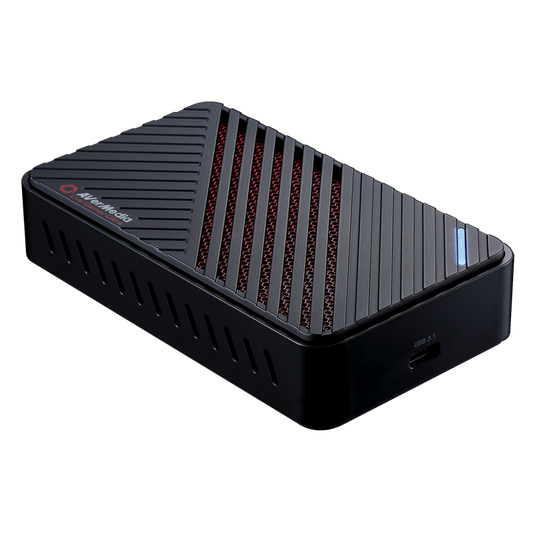
The device itself with a plastic film to protect its front cover, which was removed right away as there’s not much it’s protecting, the front cover just has an LED light which shines and flashes colors depending on is status.

Set up was pretty easy, add your input, add your passthrough output (if you want), and plug the USB C to US A cable to your computer to connect and power the device. My Windows 10 PC picked up the device and installed the driver within minutes. I would like to note that I did try to use a USB C to USB C cable to connect and power the device, but the device just flashes red at me and I couldn’t figure out how to get that to work. So, in the end I basically stuck with the USB C to USB A cable and it worked just fine, it powered up and had a solid blue indicating it was ready for use.

I powered up my Nintendo Switch and decided to use 3rd party software, OBS to see how “plug and play” it really was. No surprises here, it works as intended, you don’t need their software to work this thing, and it worked flawlessly. I didn’t notice any jitters or degradation of the video/stream on both the passthrough and capture. No audio lag or delay noticed, but I did only try for a few minutes, I’ll update this statement if needed.

I decided to try out AverMedia software, which is the RECentral 4 (current version) software. Installation was pretty quick and painless, and setting it up was just the same. The layout was really user friendly, the wizard function starts you with the choice of record or stream mode, if you go the stream route, it proceeding on helping you set up your Youtube, Twitch, etc. account to directly stream. Record mode lets you set your device and output and you’re set. You can use and modify shortcuts to make it easy to activate record and streaming functions. The one con I have about this software though is that it automatically detects the device connection whenever you plug or unplug it through its software, even when the software isn’t open and there’s no option in its setting to turn it off.

I am very impressed with this device, it was really easy to set up, and it works wonderfully. Using either its software or another capture software was simple and easy to figure out.

Drawer Title
Similar Products